










As we have established in the previous entry of this series of articles, KNX IoT is a logical additional to the widely established KNX ecosystem. It combines everything that makes KNX so robust, flexible and familiar to installers and architects, with new capabilities brought on by the utilization of IPv6 networking.
Using IPv6 means that KNX installations can leverage existing IP-networking infrastructure in a building, such as Ethernet or Wi-Fi, while also supporting the deployment of new IP-based networks where needed. This provides greater flexibility for both new installations and retrofit applications, enabling wired, wireless, and mesh networking technologies — including Ethernet, Wi-Fi, and Thread — to be used according to the specific requirements of the project. And because IP is the foundation of the internet and networked devices, it offers seamless integration with the cloud, enabling new applications and easy integration with a wide array of services.
Setting up KNX IoT devices in ETS
Even though KNX IoT is based on modern IPv6 networking technologies, it was designed in such a way that it is instantly familiar to KNX installers and architects. KNX IoT is a native part of ETS, and KNX IoT devices can be installed and configured in ETS in a familiar manner. The set-up is in many ways similar to that of traditional (TP-based) devices. KNX Partners who already know how to use secure KNX TP products will recognize the installation method of adding the security credentials to the project and configuring and downloading the KNX application. KNX IoT works in the same way: adding the security credentials and downloading the application.
What stays: no single point of failure
Unlike some other IoT protocols, especially the ones that are designed with a focus on home use, KNX has always been praised for its ability to not depend on a centralized computing device to control the installation. In KNX, all the communication is distributed between the devices that make up the installation without having to go through a central intelligence unit in the system.
This remains the same with KNX IoT. As KNX IoT is just a new “transport” method, with most everything else that makes KNX great staying the same, it will natively become part of the distributed installation. All communication is done via group addresses, and hence there is no “single point of failure”.
How to use a KNX IoT device
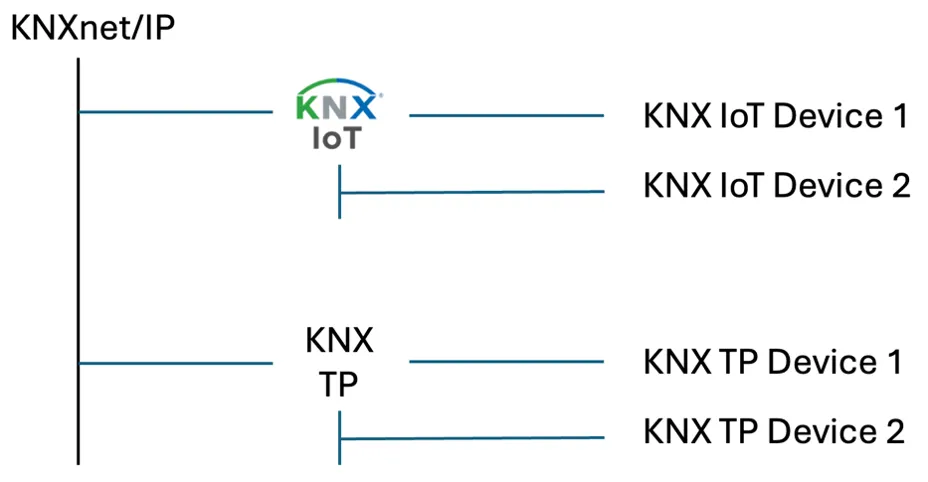
As usual, a KNX IoT device can be downloaded from the online catalogue. It can then be added to the KNX IoT area in ETS. When doing so, ETS will ask for credentials. These credentials contain the same kind of information as the FDSK for traditional TP-based KNX devices, being the serial number and the “secret” to onboard the device on the KNX secure domain. The final look of the complete KNX topology will of course also depend on whether the installation also contains TP-based devices. But to avoid issues in a later stage of the installation and configuration, it is recommended that the backbone of the installation will be set to “KNXnet/IP”.
This will lead to a typical KNX topology that will look somewhat like this:
Adding a KNX IoT device to the network
To use a KNX IoT device, it of course needs to be present on the network. The way a KNX IoT device is added to the network depends on the “physical transport” or network technology that is being used. As part of the flexibility in the design of KNX IoT, an installer can choose from an array of transport methods and select the one that best fits the situation. If the device has an ethernet-port, connecting it is very similar to connecting the “green” cable of traditional TP-based KNX products. Note that in this situation, a KNX IoT device might require an additional power source.
Setting up a KNX IoT device in ETS
A KNX IoT device on the network can easily be found by ETS. All that is needed is to make sure that the ETS connection setting is set to “KNX IoT” or just leave it on “Automatic”. ETS will then automatically scan the local network for devices of any type, including KNX IoT. Configuring a KNX IoT device is similar to any other KNX device: by creating links. A KNX IoT device has the same datapoints as any other KNX device, and they also have parameters.
The communication objects and parameters are different for each product, but their functionality is the same as with other KNX products: it will configure the device in such a way that it will expose the com objects that can be used in the project. Likewise, the linking procedure is the same. Just create a group address and link them to the communication objects of devices that need to communicate with each other. When all the links are created, all devices need to be downloaded. This downloading per device can be done via the serial number method, as the KNX IoT credentials already provided the serial number of the device.
Becoming familiar with the future of KNX
As this article has briefly outlined, many of the aspects of installing and setting up a KNX IoT device will be familiar to KNX professional. To take full advantage of all the benefits that KNX IoT offers, there are some easy to learn specifics. In a series of articles, we will go in more depth into the technology, how it works and how it can be applied, and illustrate this with practical advice and real-world examples. If you have any questions in the meantime, please refer to the new KNX website for resources and support contacts.